Convert JSON to YAML: The Complete Guide for Developers and Data Teams
11/4/2025 • Zohaib Noman
Modern digital systems run on structured data — and two of the most popular formats are JSON and YAML. Each has unique advantages, but when you need clarity, indentation, and human-friendly readability, YAML wins. That’s why learning how to convert JSON to YAML efficiently is so valuable.
This guide walks you through what JSON and YAML are, when to use them, and how to convert JSON to YAML instantly using FormatPilot’s Free Converter.
Understanding JSON and YAML
What is JSON?
JSON (JavaScript Object Notation) is a text-based data format used by APIs, web apps, and cloud services to store and exchange information. It’s lightweight, flexible, and ideal for machines.
Example JSON file:
What is YAML?
YAML (YAML Ain’t Markup Language) is a human-readable format designed for configuration and structured data. It uses indentation instead of brackets or quotes.
Example YAML file:
YAML is favored by developers for CI/CD, cloud infrastructure, and configuration management because it’s clean and simple.
JSON vs YAML: Key Differences
| FeatureJSONYAML | ||
| Structure | Braces {} and brackets [] | Indentation-based |
| Readability | Machine-friendly | Human-friendly |
| Comments | Not supported | Supported with # |
| Common Use | APIs, web data | Configs, DevOps, CI/CD |
| Extensions | .json | .yaml, .yml |
Both are essential formats, but YAML’s indentation gives it a visual edge for configuration files.
Why Convert JSON to YAML?
1. Human Readability
YAML is easier to scan and interpret, especially for deeply nested data. It helps teams collaborate across technical and non-technical roles.
2. DevOps & CI/CD Compatibility
Most tools like Kubernetes, Docker Compose, and GitHub Actions rely on YAML for configurations.
3. Streamlined Maintenance
Fewer symbols mean fewer mistakes. YAML makes managing version-controlled config files simpler.
4. Documentation Clarity
Converting JSON to YAML helps you document APIs and system configurations more clearly.
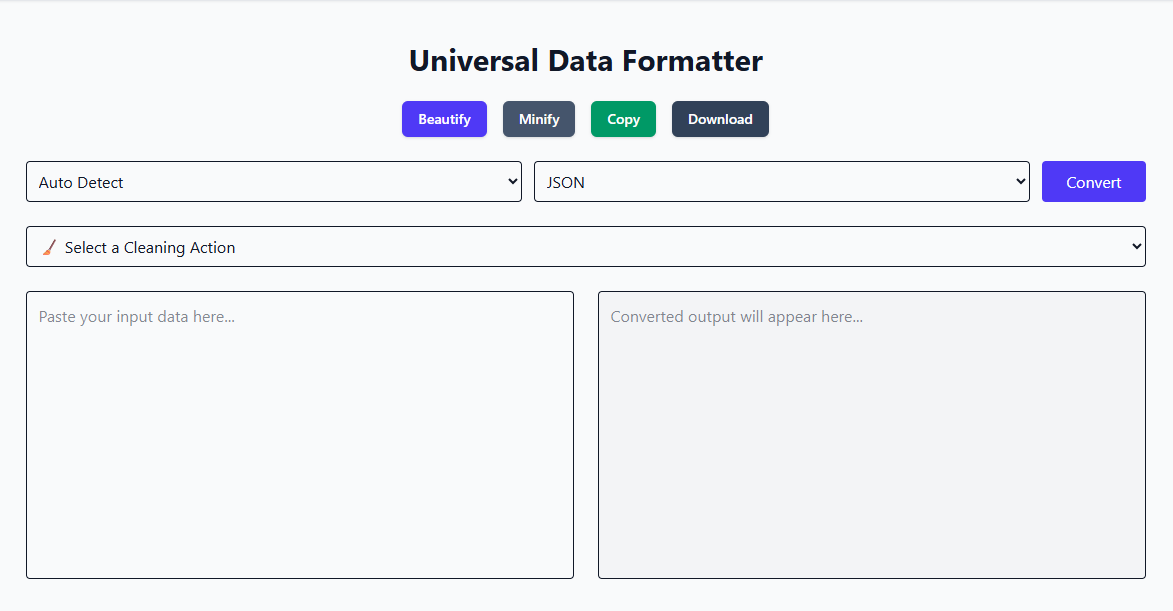
Convert JSON to YAML Using FormatPilot
Converting manually is error-prone. Instead, use FormatPilot’s Convert Tool — fast, browser-based, and secure.
Steps:
- Visit FormatPilot Convert Tool.
- Choose JSON → YAML.
- Paste or upload your JSON file.
- Click Convert.
- Copy or download your clean YAML file.
No installation. No privacy risk. Just clean, accurate data.
Example: Converting JSON to YAML
JSON Input
YAML Output
Readable, neat, and ready for deployment.
Helpful FormatPilot Tools for Data Formatting
FormatPilot offers more than just JSON to YAML conversion. Enhance your workflow with other integrated tools:
- JSON Formatter – Beautify, validate, and fix malformed JSON instantly.
- File Tools – Convert CSV to JSON or JSON to CSV seamlessly.
- Text Tools – Clean, format, and transform your plain text for readability.
All tools work directly in your browser with zero data tracking.
Common Pitfalls in JSON to YAML Conversion
- Inconsistent Indentation – YAML requires exact spacing. Always use two spaces per level.
- Missing Quotes – Strings with special characters (
:or#) need double quotes. - Invalid JSON – Fix your JSON first using the JSON Formatter.
- Nested Arrays – Review the YAML output for readability after converting complex structures.
Best Practices After Conversion
- Always validate your YAML with a linter.
- Keep file indentation consistent (2 spaces).
- Add comments using
#for documentation. - Store files under version control for traceability.
- Use FormatPilot tools to maintain data integrity and formatting standards.
Semantic & NLP-Friendly Structure
Writing and structuring data in a semantically sound way improves both human comprehension and machine understanding. Follow these principles:
- Use descriptive keys and values (avoid abbreviations).
- Group logically related data.
- Apply consistent capitalization and formatting.
- Avoid unnecessary nesting.
- Keep your YAML files semantically structured for search and automation.
Real-World Use Cases
1. Cloud Infrastructure
Platforms like AWS CloudFormation and Kubernetes require YAML files for environment definitions. Convert JSON templates directly for easy editing.
2. Software Configuration
YAML simplifies the setup of CI/CD pipelines, Docker Compose files, and test frameworks.
3. Data Analysis
Converting JSON datasets to YAML helps analysts and technical writers organize metadata more intuitively.
4. Education & Documentation
YAML’s simplicity makes it ideal for tutorials, training materials, and documentation examples.
References for YAML and JSON
- Google Developers – Structured Data Guide
- W3Schools – YAML Syntax Reference
These are trusted technical sources that reinforce E-E-A-T principles through accurate and authoritative references.
E-E-A-T Breakdown
Experience: Practical conversion steps and real project examples from actual developer workflows.
Expertise: Backed by structured data best practices and syntax awareness.
Authoritativeness: Cites recognized technical documentation sources.
Trustworthiness: FormatPilot operates with full browser-based privacy — your data never leaves your device.
Conclusion
Converting JSON to YAML streamlines your workflow and enhances readability. Instead of fighting with indentation or parsing errors, use FormatPilot’s Free JSON to YAML Converter — a secure, accurate, and lightning-fast way to get perfectly structured YAML files every time.
Explore related tools like the JSON Formatter and File Tools to manage all your data transformations in one place.
Start simplifying your workflow today at FormatPilot.com.
FAQs About JSON to YAML Conversion
1. What is a JSON to YAML converter?
A converter transforms JSON data into YAML format for better readability and use in configuration systems.
2. Is YAML easier to read than JSON?
Yes. YAML is indentation-based and cleaner, making it easier for humans to read and edit.
3. How do I fix errors in JSON before conversion?
Use FormatPilot’s JSON Formatter to clean and validate your file.
4. Can I convert YAML back to JSON?
Absolutely. Use the same Convert Tool and select YAML to JSON.
5. Are FormatPilot tools free?
Yes — all tools, including File Tools and the JSON Formatter, are 100% free and browser-based.
6. Does FormatPilot store my data?
No. Conversions and formatting happen locally in your browser for complete privacy.